Schema and UI Rendering
Knodex auto-generates deployment forms from the RGD schema definition. This page explains how schema types map to UI elements, how external references work, and how to control the user experience.
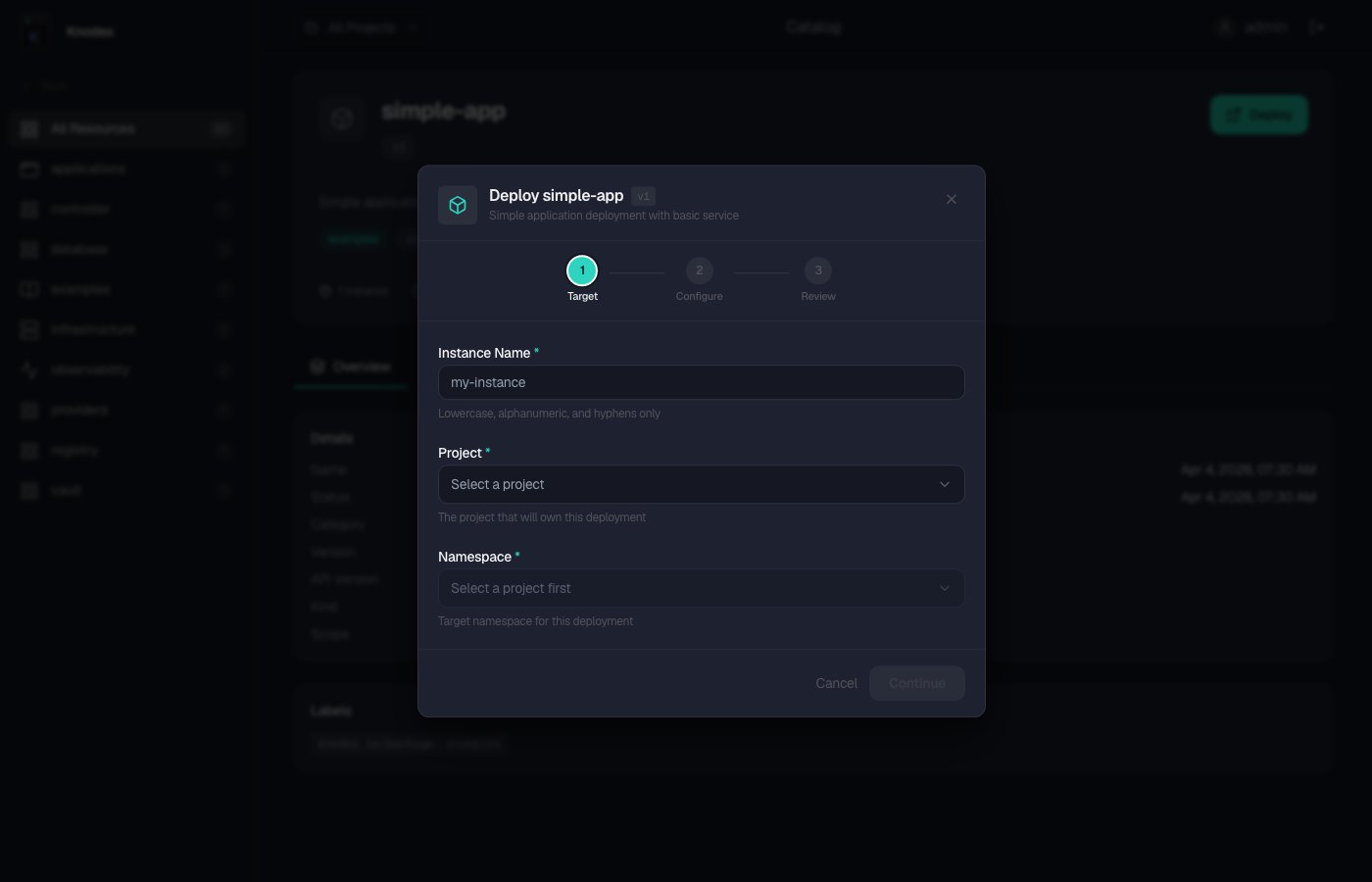
Schema Definition
The RGD schema lives under spec.schema.spec and defines the fields that users fill in when deploying an instance.
Basic Types
spec:
  schema:
    apiVersion: example.io/v1alpha1
    kind: MyResource
    spec:
      name: string
      replicas: integer | default=3
      enableHA: boolean | default=false
      memory: string | default="512Mi"
Type Reference
| Schema Type | UI Element | Notes |
|---|---|---|
string | Text input | Single-line text field |
string with default | Pre-filled text input | Default value shown, editable |
integer | Number input | Validates integer values |
boolean | Toggle switch | Default false unless specified |
object (nested) | Field group | Rendered as a nested section |
string with enum | Dropdown select | Renders as select with options |
Resource Templates
Resource templates reference schema fields using ${schema.spec.fieldName} variable substitution.
resources:
  - id: deployment
    template:
      apiVersion: apps/v1
      kind: Deployment
      metadata:
        name: ${schema.spec.name}
      spec:
        replicas: ${schema.spec.replicas}
Conditional Resources with includeWhen
Resources can be conditionally included based on schema field values using CEL expressions:
resources:
  - id: hpa
    includeWhen:
      - ${schema.spec.enableHA == true}
    template:
      apiVersion: autoscaling/v2
      kind: HorizontalPodAutoscaler
      metadata:
        name: ${schema.spec.name}
      spec:
        scaleTargetRef:
          apiVersion: apps/v1
          kind: Deployment
          name: ${schema.spec.name}
        minReplicas: ${schema.spec.minReplicas}
        maxReplicas: ${schema.spec.maxReplicas}
When enableHA is false, the HPA resource is not created.
Advanced Configuration
Fields under spec.advanced receive special UI treatment. They are rendered in a collapsible "Advanced Configuration" section that is collapsed by default.
Defining Fields Under spec.advanced
spec:
  schema:
    apiVersion: example.io/v1alpha1
    kind: MyApp
    spec:
      name: string
      image: string
      advanced:
        logLevel: string | default="info"
        metricsEnabled: boolean | default=true
        resourceLimits:
          cpu: string | default="500m"
          memory: string | default="512Mi"
        nodeSelector:
          key: string | default=""
          value: string | default=""
UX Behavior
- The advanced section is collapsed by default in the deploy form
- Users expand it to see optional configuration
- All advanced fields must have defaults so that deploying without expanding the section produces a valid manifest
- Nested properties under
advancedare rendered as grouped fields within the collapsible section
Requirements for Defaults
Every field under spec.advanced should have a sensible default. If a user deploys without opening the advanced section, all advanced fields use their defaults. An advanced field without a default becomes effectively required, which defeats the purpose.
Nested Properties
Nested objects under advanced are rendered as sub-groups:
advanced:
  logging:
    level: string | default="info"
    format: string | default="json"
  resources:
    cpu: string | default="250m"
    memory: string | default="256Mi"
This renders as two groups ("logging" and "resources") within the advanced section.
Referencing in Templates
Advanced fields are referenced using the full path:
resources:
  - id: deployment
    template:
      apiVersion: apps/v1
      kind: Deployment
      spec:
        template:
          spec:
            containers:
              - name: app
                resources:
                  limits:
                    cpu: ${schema.spec.advanced.resourceLimits.cpu}
                    memory: ${schema.spec.advanced.resourceLimits.memory}
                env:
                  - name: LOG_LEVEL
                    value: ${schema.spec.advanced.logLevel}
External References
External references (externalRef) declare dependencies on existing Kubernetes resources. In the deploy form, they render as resource pickers.
Paired Pattern with Resource Picker
An externalRef is paired with a schema field that captures the reference coordinates:
spec:
  schema:
    apiVersion: example.io/v1alpha1
    kind: AppWithDB
    spec:
      appName: string
      dbRef:
        name: string
        namespace: string
  resources:
    - id: database
      externalRef:
        apiVersion: db.knodex.io/v1alpha1
        kind: PostgresCluster
      readyWhen:
        - key: status.ready
          value: "true"
    - id: deployment
      template:
        apiVersion: apps/v1
        kind: Deployment
        metadata:
          name: ${schema.spec.appName}
        spec:
          template:
            spec:
              containers:
                - env:
                    - name: DB_HOST
                      value: ${database.status.host}
How It Works
- Knodex detects the
externalRefresource definition during catalog discovery - The deploy form renders a resource picker for the paired schema field (
dbRef) - The picker shows existing instances of
PostgresClusterthat the user has access to - When the user selects an instance,
dbRef.nameanddbRef.namespaceare populated automatically
Namespace Filtering
The resource picker filters instances based on:
- The project's allowed destination namespaces
- The user's Casbin permissions for instances in those namespaces
- The
readyWhenconditions (optionally, showing only ready resources)
Multiple External References
An RGD can have multiple externalRef resources:
resources:
  - id: database
    externalRef:
      apiVersion: db.knodex.io/v1alpha1
      kind: PostgresCluster
  - id: cache
    externalRef:
      apiVersion: cache.knodex.io/v1alpha1
      kind: RedisCluster
  - id: deployment
    template:
      # uses ${database.status.host} and ${cache.status.host}
Each externalRef gets its own resource picker in the form.
Nested References for Composite RGDs
External references can chain across RGDs. If RGD-A produces KindA and RGD-B has an externalRef to KindA, deploying RGD-B shows a picker for existing KindA instances.
Combining with Conditional Resources
resources:
  - id: cache
    includeWhen:
      - ${schema.spec.cacheEnabled == true}
    externalRef:
      apiVersion: cache.knodex.io/v1alpha1
      kind: RedisCluster
The resource picker for cache only appears when cacheEnabled is true.
Secret Reference Descriptions
When an externalRef references a Kubernetes Secret, you can add a description to help users understand what the secret should contain.
Adding Descriptions
Secret descriptions are provided through the schema field's structure:
spec:
  schema:
    apiVersion: example.io/v1alpha1
    kind: MyApp
    spec:
      name: string
      dbSecret:
        name: string
        namespace: string
  resources:
    - id: db-credentials
      externalRef:
        apiVersion: v1
        kind: Secret
      readyWhen:
        - key: data.password
          exists: true
How It Renders
| Element | Display |
|---|---|
| Secret picker label | Derived from the schema field name (e.g., "DB Secret") |
| Required indicator | Shown if the field has no default |
| Namespace filter | Scoped to the project's destination namespaces |
| Secret list | Shows secrets the user has access to in allowed namespaces |
Reference Types
| Reference Type | externalRef Kind | UI Element |
|---|---|---|
| Custom Resource | Any custom Kind (e.g., PostgresCluster) | Resource picker with instance list |
| Secret | Secret (v1) | Secret picker with secret list |
| ConfigMap | ConfigMap (v1) | Resource picker with ConfigMap list |
Best Practice
Always include readyWhen conditions on secret references to ensure the secret exists and has the expected keys before dependent resources are created.
UI Rendering Behavior
Field Rendering
| Schema Pattern | UI Behavior |
|---|---|
fieldName: string | Required text input |
fieldName: string | default="value" | Optional text input, pre-filled |
fieldName: integer | Required number input |
fieldName: integer | default=3 | Optional number input, pre-filled |
fieldName: boolean | Toggle, default false |
fieldName: boolean | default=true | Toggle, default true |
| Nested object | Collapsible field group |
spec.advanced.* | Collapsed "Advanced" section |
externalRef paired field | Resource/Secret picker |
Default Value Handling
- Fields with defaults are not marked as required in the form
- Fields without defaults are marked as required
- Default values are pre-populated in the form
- Users can clear a default to explicitly set an empty value (for strings)
Visibility Rules
- Fields under
spec.advancedare hidden by default (collapsed section) - Fields paired with
externalRefresources show picker UI instead of plain text inputs - Boolean fields always render as toggles, never as text inputs
- Nested objects render as grouped sections with a header derived from the field name
Complete Example RGD
This example demonstrates most schema and UI features together:
apiVersion: kro.run/v1alpha1
kind: ResourceGraphDefinition
metadata:
  name: full-stack-app
  annotations:
    knodex.io/catalog: "true"
    knodex.io/title: "Full-Stack Application"
    knodex.io/description: "Web app with database, cache, and monitoring"
    knodex.io/category: "applications"
    knodex.io/icon: "layers"
    knodex.io/extends-kind: "PostgresCluster,RedisCluster"
    knodex.io/property-order: '["appName","image","dbRef.name","dbRef.namespace","cacheRef.name"]'
    knodex.io/deployment-modes: "gitops,hybrid"
spec:
  schema:
    apiVersion: apps.knodex.io/v1alpha1
    kind: FullStackApp
    spec:
      # Top-level required fields (shown first due to property-order)
      appName: string
      image: string

      # External reference fields (render as pickers)
      dbRef:
        name: string
        namespace: string
      cacheRef:
        name: string
        namespace: string

      # Optional top-level fields
      replicas: integer | default=2
      port: integer | default=8080

      # Advanced configuration (collapsed by default)
      advanced:
        logLevel: string | default="info"
        metricsEnabled: boolean | default=true
        healthCheck:
          path: string | default="/healthz"
          intervalSeconds: integer | default=30
        resources:
          cpuLimit: string | default="1"
          memoryLimit: string | default="1Gi"
          cpuRequest: string | default="250m"
          memoryRequest: string | default="256Mi"

  resources:
    # External dependencies
    - id: database
      externalRef:
        apiVersion: db.knodex.io/v1alpha1
        kind: PostgresCluster
      readyWhen:
        - key: status.ready
          value: "true"

    - id: cache
      externalRef:
        apiVersion: cache.knodex.io/v1alpha1
        kind: RedisCluster
      readyWhen:
        - key: status.ready
          value: "true"

    # Application deployment
    - id: deployment
      template:
        apiVersion: apps/v1
        kind: Deployment
        metadata:
          name: ${schema.spec.appName}
        spec:
          replicas: ${schema.spec.replicas}
          selector:
            matchLabels:
              app: ${schema.spec.appName}
          template:
            metadata:
              labels:
                app: ${schema.spec.appName}
            spec:
              containers:
                - name: app
                  image: ${schema.spec.image}
                  ports:
                    - containerPort: ${schema.spec.port}
                  env:
                    - name: DB_HOST
                      value: ${database.status.host}
                    - name: REDIS_HOST
                      value: ${cache.status.host}
                    - name: LOG_LEVEL
                      value: ${schema.spec.advanced.logLevel}
                  resources:
                    limits:
                      cpu: ${schema.spec.advanced.resources.cpuLimit}
                      memory: ${schema.spec.advanced.resources.memoryLimit}
                    requests:
                      cpu: ${schema.spec.advanced.resources.cpuRequest}
                      memory: ${schema.spec.advanced.resources.memoryRequest}
                  livenessProbe:
                    httpGet:
                      path: ${schema.spec.advanced.healthCheck.path}
                      port: ${schema.spec.port}
                    periodSeconds: ${schema.spec.advanced.healthCheck.intervalSeconds}

    # Service
    - id: service
      template:
        apiVersion: v1
        kind: Service
        metadata:
          name: ${schema.spec.appName}
        spec:
          selector:
            app: ${schema.spec.appName}
          ports:
            - port: 80
              targetPort: ${schema.spec.port}

    # Conditional monitoring
    - id: service-monitor
      includeWhen:
        - ${schema.spec.advanced.metricsEnabled == true}
      template:
        apiVersion: monitoring.coreos.com/v1
        kind: ServiceMonitor
        metadata:
          name: ${schema.spec.appName}
        spec:
          selector:
            matchLabels:
              app: ${schema.spec.appName}
          endpoints:
            - port: metrics
              interval: 30s